

The protocol is somewhere in my notes
If you’re a fan of the Huberman Lab podcast like me, you’ve probably written down a protocol you wanted to try. Mine usually ended up in the Notes app. Yours might be on a piece of paper, in a screenshot, or buried among saved podcast episodes. Or worse, you might get lost in Reddit hell (yes, there is a Reddit topic even for the HubermanLab podcast, sigh) trying to piece a meaningful protocol together.
Then, when you actually want to use it, you have to find it again. Which note was it in? What did you call it? And even if you find it, there’s still a gap between having something written down and doing it. A note won’t remind you when it’s time, or show you where that activity fits alongside everything else you planned.
Take morning light, one of the topics in Andrew Huberman’s Toolkit for Sleep. Writing “go outside after waking” is a start. But you still need to decide when you’ll go, make room for it, and remember it tomorrow.
That’s the problem Kairis protocols are meant to help with. Here’s how to use the features available in v1.3 to take a few ideas out of your notes and put them into your day.
Kairis is not affiliated with, sponsored by, or endorsed by Andrew Huberman or Huberman Lab.
Start with the things you want to do
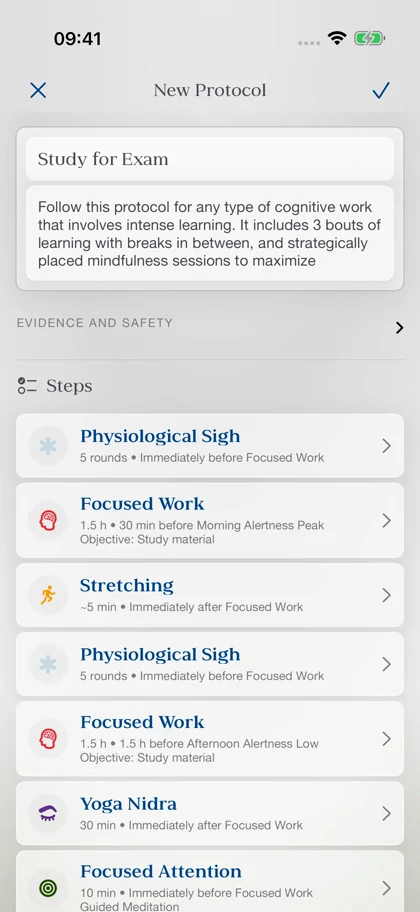
Say you have an exam coming up. Sitting down with your notes is one thing; settling into studying when you’re worrying about the exam is another. That’s why “Study for Exam,” the protocol below, starts with a physiological sigh before focused work. The intention is to take the edge off that tension before you begin. Huberman discusses this use of the breathing technique in Tools for Managing Stress & Anxiety.
Then comes the studying. The first work session is placed around the modeled morning alertness peak, with the aim of giving demanding material a slot when you might feel more awake. Afterward, stretching gives you a reason to get out of your chair and take a break before the next bout. You’re deciding in advance when to stop as well as when to start.
The second study session finishes at the modeled afternoon alertness low. That’s where Yoga Nidra comes in: instead of pushing straight into more work as your alertness may dip, you’ve set aside time to rest after learning. In Using Science to Optimize Sleep, Learning & Metabolism, Huberman discusses post-learning NSDR as a way to support learning and retention. That’s the thinking behind placing it here.
Before a later study bout, a Focused Attention meditation creates a transition back to paying attention to one thing. Each step has a job: settle before studying, make room for a break, rest after learning, then return to the material. In Kairis, you can connect those steps to the work sessions and modeled circadian events, rather than calculate every start time yourself. Adjust the plan to your day—the clock is a model, and how you actually feel still matters.
Choose what goes into your protocol
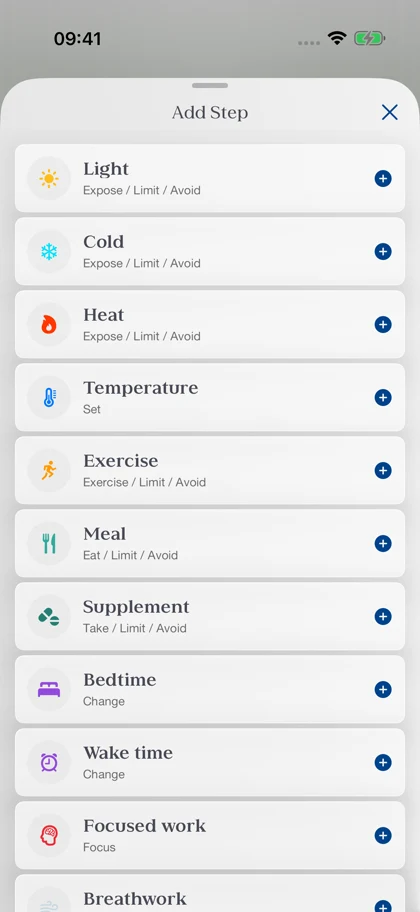
A study session is just one example. Kairis has 16 types of protocol steps, covering anything from light, heat and cold exposure to exercise, meals and breathing exercises. You can put together a morning protocol, plan your training day, or make time for meditation, Yoga Nidra and journaling before bed. And a step doesn’t always mean adding something to your day: you might want morning light but less light in the evening, or a reminder to avoid a meal close to another activity. Where supported, steps let you choose whether to do, limit or avoid something. Pick the activities that belong in your protocol, then set the available durations, parameters and notes for each. You can combine different step types in the same protocol, so the whole plan stays together.
Build elaborate exercise routines
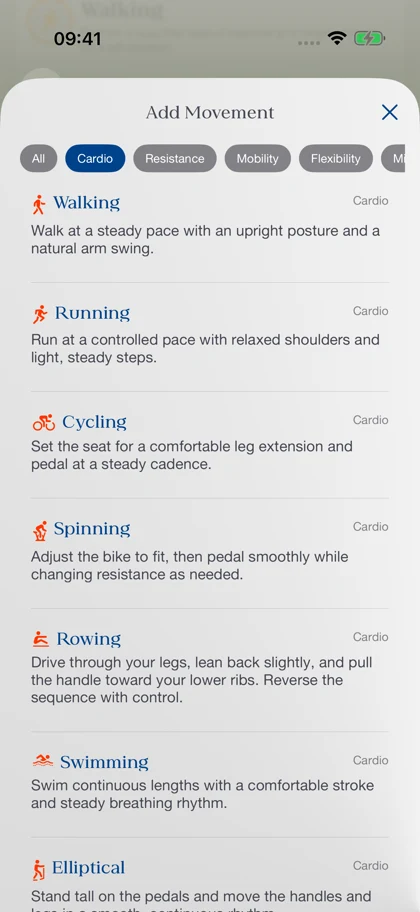
A reminder to “exercise” gets you to the session, but you still need to know what you’re going to do. The Exercise step lets you build the routine itself from individual movements. Browse cardio, resistance, mobility, flexibility, mind & body, sport and mixed categories: that might mean running or cycling, squats and rows, a mobility flow, or Pilates. You can put different movements into one routine, so a warm-up, strength work and stretching can stay together. Set a duration, repetitions, sets or distance as appropriate, and add rest between movements, intensity targets and notes where you need them. Once you’ve put together a routine you want to repeat, save it as a preset. Next time, you can reuse it without entering every movement again. And if you’d rather have somewhere to start, Kairis comes with built-in exercise presets you can use as a starting point for your own sessions.
Schedule around your rhythm
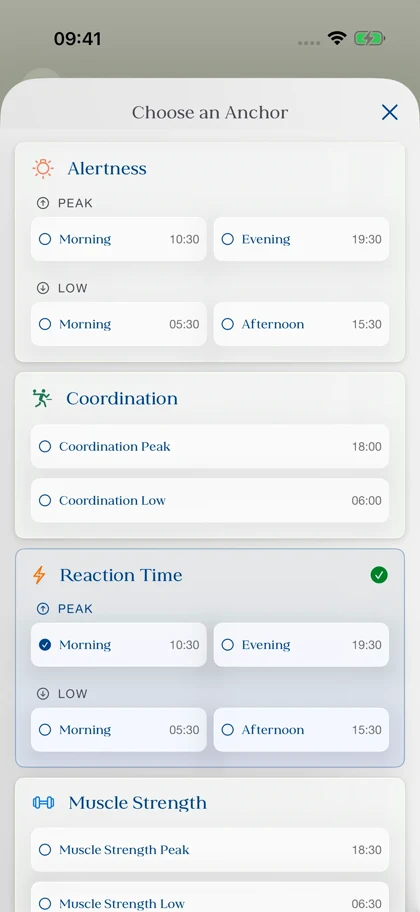
“Go outside at 7 a.m.” works until you sleep in on Saturday. “Go outside within 30 minutes of waking” keeps the intention intact. That’s what timing anchors let you do in Kairis: describe when an activity belongs in your day without tying everything to a fixed hour. Beyond wake time and bedtime, you can anchor steps to modeled circadian events such as your morning alertness peak, melatonin onset or muscle strength peak. Say you want to fit resistance exercise within 90 minutes of your modeled muscle strength peak, but still need some room to work around dinner. You can give it that window instead of choosing one exact start time. And you can mix these options within the same protocol: morning light after waking, study near an alertness peak, a reminder at a fixed time, and stretching immediately after exercise. Combine fixed times, flexible windows, circadian anchors and steps linked to one another in whatever way fits your protocol. That flexibility is what makes the protocol creator powerful: you can build the schedule around how you want the day to work.
Put it on the calendar.
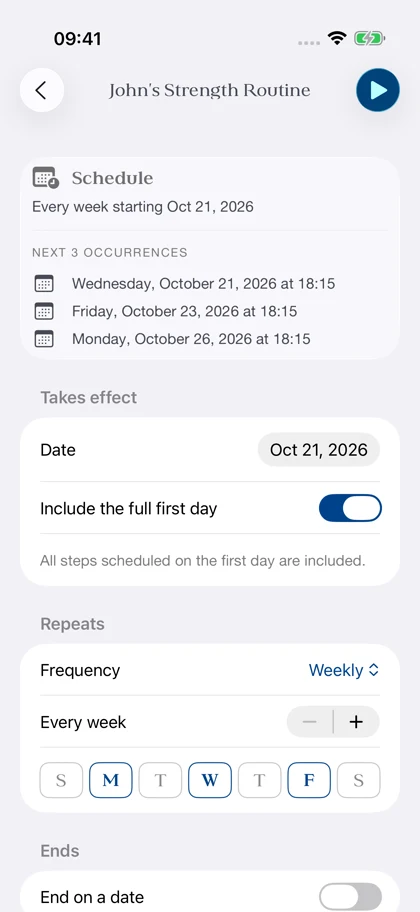
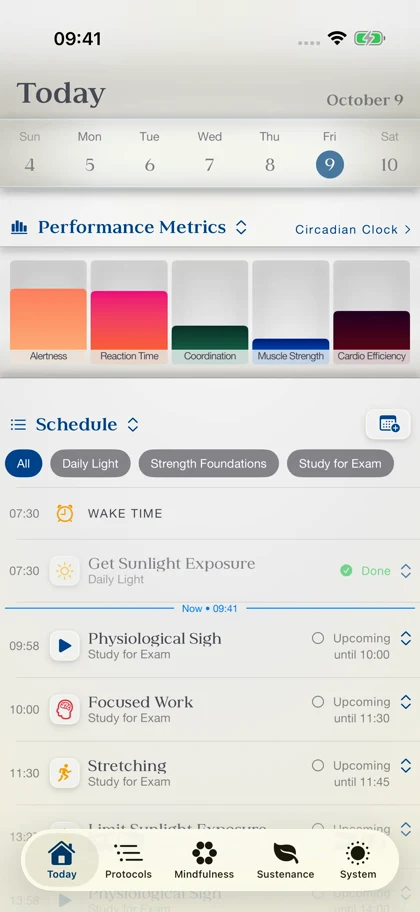
Once you’ve built your protocol, give it a place on Kairis’s built-in calendar. That’s when it becomes something you can follow today, rather than another protocol saved for later. Choose a start date, then decide whether it runs once or repeats daily, weekly, monthly or yearly, with an interval that fits your plans. For a strength routine, that might mean Monday, Wednesday and Friday each week; for a study protocol, you might set an end date for the day before your exam. You can also enable reminders at the start of scheduled steps. Open Today and the activities from your scheduled protocols are there together, in order, so you can see what’s next and mark things complete or skip them when plans change. And when it’s time for Yoga Nidra, Meditation or Breathwork, you can launch the session directly from Today. You’ve already chosen the activity and made time for it; now you can just press play.
Save it, adapt it, share it
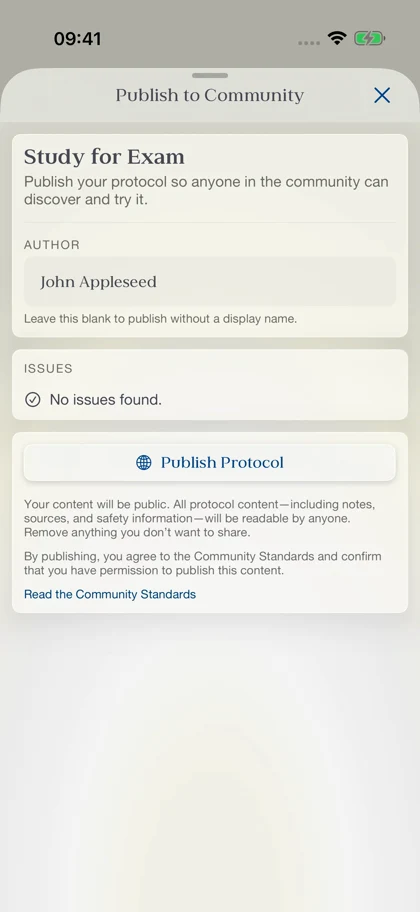
You can keep your own protocols organized, browse built-in and community protocols, and save protocols to your collection. If someone else has made something useful, adapt a copy to your schedule. If you want to share yours, use a link or code, or publish it for others to discover.
Start with one of those ideas you’ve been saving for later. Give it a step, a time and a reminder, then see how it fits. You can explore Kairis protocols or get Kairis on the App Store to try it yourself.